How to Create APAAR ID: Step-by-Step Process
The APAAR ID process is quite simple to follow. Students need to have their Aadhaar card which is valid and register themselves for Digi Locker to have e-KYC. The process is typically initiated by the student's school or college after obtaining the necessary consent.
Step 1: Visit the Academic Bank of Credits (ABC) Portal

Begin the APAAR ID registration process by visiting the official Academic Bank of Credits (ABC) portal. This is the platform where students can initiate the registration process and access student-related services.
Step 2: Select the Student Registration Option

On the homepage, click on My Account and select the Student option. This will redirect you to the student registration page, where you can begin creating your academic profile.
Step 3: Create a DigiLocker Account

If you do not already have a DigiLocker account, click Sign Up and register using your mobile number, address, and Aadhaar details. Existing users can skip this step and proceed to log in.
Step 4: Log In to DigiLocker

Sign in to your DigiLocker account using your registered credentials. DigiLocker is used to verify your identity and securely share the required information during the registration process.
Step 5: Complete Aadhaar e-KYC Verification

Provide your consent by selecting "I Agree" to allow DigiLocker to share your Aadhaar details with the ABC portal. This completes the e-KYC verification and helps confirm your identity.
Step 6: Enter Your Academic Details

Fill in your educational information, including your school or university name and your current class, semester, or course. Before moving ahead, review the details to ensure they are accurate.
Step 7: Submit the Application to Generate Your APAAR ID
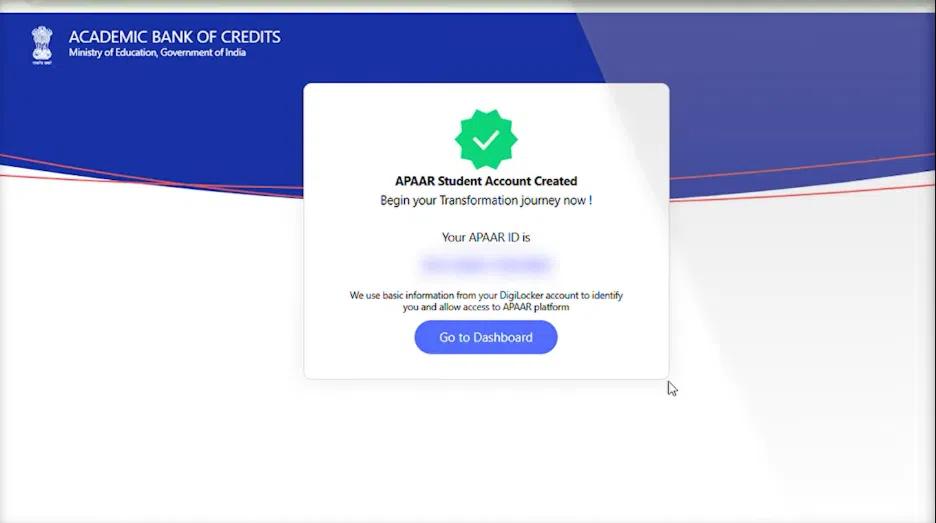
Once all the information has been verified, submit your application. After successful verification by the concerned authorities, a unique APAAR ID will be generated, which can be used to securely manage your academic records throughout your educational journey.
Prerequisites for APAAR ID Registration
Before applying for an APAAR ID, ensure the following requirements are met:
- Have a valid Aadhaar card.
- Ensure your name in UDISE+ records matches your Aadhaar details.
- Keep your Personal Education Number (PEN) ready.
- Create a DigiLocker account for e-KYC verification.
- Obtain parental consent if required by your institution.
What Is Identity Value in APAAR ID?
It refers to the unique identifier generated during the APAAR ID creation process that helps establish and verify a student's digital academic identity. It is used within the APAAR ecosystem to uniquely identify a student's academic profile and ensure that educational records are securely linked to the correct individual.
Why Is It Generated?
The Identity Value is generated to create a unique and verified digital identity for every student. It helps educational institutions maintain accurate academic records while minimizing the chances of duplicate profiles.
- Creates a unique digital identity for each student.
- Helps securely link academic records to the correct student.
- Reduces duplicate or incorrect student records.
- Supports seamless record management across educational institutions.
How Is It Different from APAAR Number?
Although the terms are often used interchangeably, the Identity Value and APAAR Number serve different purposes within the APAAR ecosystem.
Identity Value | APAAR Number |
A unique identifier used to establish a student's digital identity. | The unique 12-digit student ID assigned after successful APAAR registration. |
Used internally during identity verification and record management. | Used by students and institutions to access and manage academic records. |
Supports accurate mapping of student information. | Acts as the student's lifelong academic identity. |
Note: Official terminology and implementation may evolve over time. Students should refer to the latest Ministry of Education or APAAR guidelines for updated definitions.
Where Can Students Find It?
Students can typically access their Identity Value and APAAR-related information through the official platforms used during registration.
- Check your APAAR profile after successful registration.
- Access your details through the Academic Bank of Credits (ABC) portal, where applicable.
- View linked information via Digi Locker if integrated with your APAAR account.
- Contact your school or educational institution if you are unable to locate your Identity Value.
People Also Read: Best UGC-Approved Online MCA Universities
What Is the Purpose of APAAR ID?
The main purpose of this system is to give each student a personalized digital identity to manage their academic records in a safe manner. This system has been launched through the National Education Policy (NEP) 2020 to ease the management of students' academic records.
Academic Record Management
APAAR ID helps students maintain their academic records in a secure digital format throughout their educational journey.
- Stores verified academic records in one place.
- Reduces dependence on physical documents.
- Makes it easier to access educational certificates and records when required.
Student Mobility
APAAR ID supports smoother transitions between schools, colleges, and universities by maintaining a continuous academic record.
- Enables institutions to access verified student records.
- Reduces repetitive documentation during admissions or transfers.
- Supports a seamless academic journey across participating institutions.
Credit Transfer
For higher education students, APAAR integrates with the Academic Bank of Credits (ABC) to facilitate academic credit management.
- Helps digitally store eligible academic credits.
- Supports credit transfer between participating institutions.
- Encourages flexible learning pathways under applicable education policies.
Digital Identity
APAAR provides students with a lifelong digital academic identity that remains associated with their educational achievements.
- Creates a unique student identity.
- Links verified academic records with digital platforms.
- Strengthens the digital education ecosystem in India.
Lifelong Learning
APAAR is designed to support students throughout their learning journey, from school education to higher education and beyond.
- Maintains a lifelong academic profile.
- Enables easy access to educational records at different stages of learning.
- Supports continuous education and future academic opportunities.
Keep reading Online MCA Admission Process
Who Can Create an APAAR ID?
If you're wondering who is eligible to apply, APAAR ID is primarily intended for students enrolled in recognized educational institutions across India. Eligibility may vary based on the institution's participation in the APAAR initiative and the applicable government guidelines.
Eligibility Checklist
Category | Eligibility |
School Students | Eligible if enrolled in a participating school. Parent or guardian consent may be required for minors. |
College Students | Eligible if studying in a recognized college or higher education institution participating in the APAAR ecosystem. |
University Students | Eligible if enrolled in a recognized university that supports APAAR implementation. |
Open School Students | May be eligible if their open schooling institution is covered under the APAAR initiative. |
Adult Learners | Eligibility depends on enrollment in a participating educational institution and applicable government guidelines. |
Further Read: Online MCA Eligibility Criteria in India
Is APAAR ID Mandatory?
The answer is that the creation of an APAAR ID is not mandatory throughout India. The decision to use APAAR ID will vary depending on the policy of the Ministry of Education, state education departments, and educational institutions. Though most schools and colleges are urging the students to create their APAAR ID, the latest guidelines must always be considered.
Current Government Guidelines
APAAR ID has been introduced as part of the Government of India's efforts to build a digital education ecosystem under the National Education Policy (NEP) 2020.
- The implementation of APAAR ID may vary across states and institutions.
- Schools and colleges adopt APAAR in phases.
- Students should check with their educational institution for the latest guidelines.
Note: If you are looking for what is APAAR ID for students in Hindi, you can also refer to official government resources that provide multilingual guidance.
Parent Consent Requirements
For school students who are minors, parental or guardian consent plays an important role in the APAAR registration process.
- Schools generally obtain consent before creating an APAAR ID.
- Parents should review the information shared by the institution before providing approval.
- Consent requirements may differ depending on the institution and applicable guidelines.
Can Students Opt Out?
In many cases, students or parents can choose not to create an APAAR ID if they do not wish to participate, particularly where consent is required.
- Parents may decline consent for minor students, subject to institutional policies.
- Students should discuss any concerns with their school or college.
- Always refer to the latest official government and institutional guidelines before making a decision.
What Happens If You Don't Create APAAR?
If you do not create an APAAR ID, your academic journey generally continues as per your institution's existing processes.
- You may continue using the documentation process followed by your institution.
- You may not be able to access certain APAAR-enabled digital services if your institution adopts them.
- Check with your school or college to understand whether an APAAR ID is required for specific academic services or initiatives.
Read: Online MCA Colleges without Entrance Exams
Benefits of APAAR ID for Students
Now that you know what APAAR ID is, let's look at how it benefits students. Below are some of the key benefits of APAAR ID:
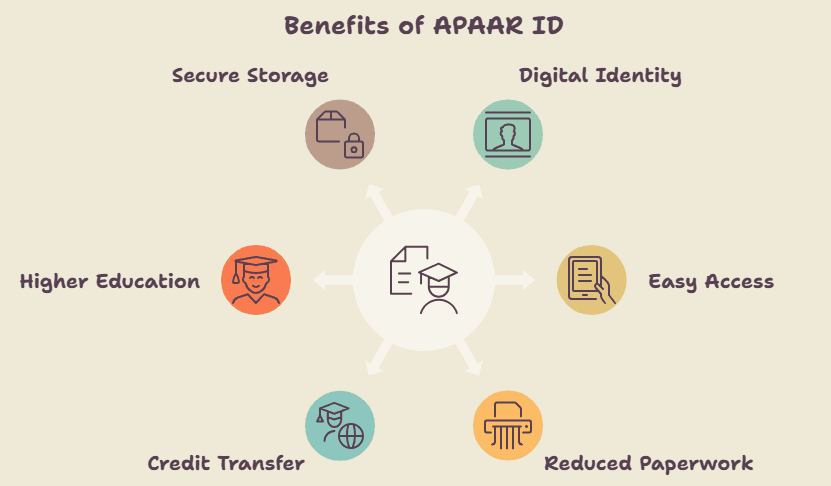
Digital Academic Identity
APAAR ID gives every student a unique digital academic identity that remains associated with them throughout their education.
- Creates a single academic identity from school to higher education.
- Helps maintain verified educational records in one place.
- Reduces the chances of duplicate academic profiles.
Easy Access to Academic Records
Students can access their verified academic documents more conveniently through integrated digital platforms.
- Makes it easier to access marksheets and certificates.
- Keeps educational records organized digitally.
- Supports quick verification whenever required.
Reduced Paperwork
APAAR ID minimizes the need for carrying and submitting multiple physical documents.
- Reduces dependence on paper-based records.
- Simplifies document submission during admissions or transfers.
- Saves time by maintaining records digitally.
Credit Transfer
For eligible higher education students, APAAR works with the Academic Bank of Credits (ABC) to support academic flexibility.
- Helps digitally maintain eligible academic credits.
- Supports credit transfer between participating institutions.
- Encourages flexible learning pathways.
Better Higher Education Opportunities
APAAR ID enables students to maintain a continuous academic record that can support future educational pursuits.
- Keeps academic achievements linked to one digital profile.
- Makes educational records easier to access when applying for higher studies.
- Supports a smoother transition between institutions.
Secure Digital Storage
One of the biggest advantages of APAAR ID is the secure digital storage of academic information.
- Keeps academic records safely stored in digital format.
- Reduces the risk of losing important educational documents.
- Allows students to access verified records through integrated government platforms, where applicable.
APAAR ID vs Aadhaar vs ABC ID
While all three are unique identifiers, they serve different purposes. Aadhaar is used to establish an individual's identity, APAAR ID creates a lifelong digital academic identity, and ABC ID helps higher education students digitally store and transfer academic credits.
The table below highlights the key differences:
Feature | APAAR ID | Aadhaar | ABC ID |
Full Form | Automated Permanent Academic Account Registry | Aadhaar | Academic Bank of Credits ID |
Purpose | Creates a lifelong digital academic identity for students | Establishes an individual's identity and address | Digitally stores and manages academic credits in higher education |
Issued By | Ministry of Education (through the APAAR ecosystem) | Unique Identification Authority of India (UIDAI) | Academic Bank of Credits under the Ministry of Education |
Who Can Get It? | Students enrolled in participating educational institutions | All eligible residents of India | Students enrolled in eligible higher education institutions |
Primary Use | Managing and accessing academic records | Identity verification for various government and private services | Credit accumulation, transfer, and redemption |
Linked With | DigiLocker, ABC, and other education platforms | Government welfare schemes, banking, PAN, and more | APAAR ID and higher education institutions |
Validity | Lifelong academic identity | Lifelong identity proof | Valid throughout a student's higher education journey |
People Also Read: Online MCA vs Distance MCA
Is APAAR ID Safe? Privacy, Consent & Data Security Explained
The APAAR ID is designed with confidentiality and security features. The students’ educational records are digitally stored in a secure way, and data sharing is done on a consent basis. This gives the students control over who accesses their educational records.
What Student Data Is Stored?
APAAR ID stores key academic details, including:
- Student's basic identity information linked with education records
- School, college, and enrollment details
- Academic achievements, marksheets, certificates, and credits
- Co-curricular and skill-related records (where applicable)
Who Can Access It?
Access to APAAR data is limited and consent-based.
- Students can view their own records.
- Schools, colleges, and authorized education authorities can access records only for official academic purposes.
- Records are shared only with the student's consent wherever applicable.
Can Students Delete APAAR ID?
Students can choose not to create or link an APAAR ID if they do not wish to participate. However, once an APAAR ID is created and academic records are linked, deletion may not always be possible due to education record retention policies.
Note: Students should check the latest APAAR guidelines or contact their educational institution for specific requests.
Read about Top NIRF Online MCA Colleges in India
Common Problems While Creating APAAR ID (and Solutions)
If you face issues while creating an APAAR ID, don't worry. Most problems are caused by incorrect details, Aadhaar verification issues, or school record mismatches. The table below lists common APAAR ID problems along with their possible causes and solutions.
Problem | Possible Cause | Solution |
Unable to create APAAR ID | Aadhaar details do not match school records | Ensure your name, date of birth, and gender are the same in both Aadhaar and school records before trying again. |
Aadhaar OTP not received | Incorrect mobile number linked with Aadhaar or network issues | Verify that your current mobile number is linked to Aadhaar and request the OTP again after a few minutes. |
Student record not found | School has not uploaded or updated student information | Contact your school administration and ask them to update your details in the UDISE+ system. |
APAAR ID creation failed | Temporary server or portal issue | Wait for some time and try again later or use a different browser/device. |
Incorrect personal details displayed | Outdated or incorrect school records | Request your school to correct the records before creating your APAAR ID. |
Consent or verification error | Required consent was not provided during registration | Review the consent section carefully and complete the verification process. |
Duplicate APAAR ID issue | APAAR ID may have already been generated | Contact your school or the concerned authority to verify your existing APAAR ID instead of creating a new one. |
Unable to access APAAR ID after creation | Login credentials or linked account issue | Sign in using the correct credentials or seek assistance from your school if the issue continues. |
Further Read: Top NAAC A+ Online MCA Colleges
Common Myths About APAAR ID
Many students and parents have misconceptions about the APAAR ID. Below a quick myth vs. fact table to clear the confusion.
Myth | Fact |
APAAR ID replaces Aadhaar. | APAAR ID is different from Aadhaar. Aadhaar is used only for identity verification, while APAAR ID is meant for managing academic records. |
APAAR ID stores biometric data. | No. APAAR ID stores educational records, not biometric information like fingerprints or iris scans. |
APAAR ID is compulsory for every student. | No. APAAR ID is generally consent-based, and implementation may vary according to government guidelines and educational institutions. |
APAAR ID is only for CBSE students. | No. APAAR ID is intended for students across different education boards and institutions participating in the initiative. |
APAAR ID is only for higher education. | No. APAAR ID is designed for students across the school and higher education ecosystem. |
APAAR ID shares student data publicly. | No. APAAR ID follows consent-based data sharing, and student records are accessible only to authorized entities for academic purposes. |
Get insights about Top NAAC A++ Online MCA Universities.
Conclusion
The APAAR ID refers to a unique digital identity of the student to facilitate him/her in managing their academic records from the beginning till the end of his/her academic journey. In accordance with the NEP 2020, the APAAR ID would ensure that the user can get lifelong access to academic records along with certificate verification and credit transfer facility.
It is highly recommended that before registering for APAAR ID, the student along with his/her parents must be aware of the process of registration and other privacy concerns. Need help with APAAR ID? You can contact our counselors to understand the registration process and receive the most up-to-date guidance.